In this article
- What is online financial advisory?
- How the process works step by step
- Which authorisations are needed?
- The first month of online accounting
- Communication
- Digital document storage
- How is security ensured?
- When is a face-to-face meeting needed?
- Who is online accounting suitable for?
- Online payroll for businesses with employees
- Online vs office model
- Frequently Asked Questions
- In Short
Short answer: Yes, you can receive accounting services without visiting an office. With online financial advisory, invoices and receipts are sent by photo, email or an online folder, and e-invoice records arrive in the system automatically. The financial advisor records them, files returns electronically and sends you payment amounts digitally. Face-to-face meetings remain available for matters requiring wet signatures and important decisions.
In Turkey, most tax and social security procedures are now electronic: e-Return, e-Invoice, e-Ledger, e-Notification and social security e-Declaration. Thanks to this infrastructure, there is no need to visit an office every month. This guide explains how online accounting works, which authorisations are needed and how security is ensured.
What is online financial advisory?
Online financial advisory is a licensed Certified Public Accountant providing the same service through digital channels. The content does not change: bookkeeping, returns, payroll, social security filings and advice are all still done. What changes is the channel for documents and communication. What matters is that the person is a genuinely licensed professional; we explain how to verify this in financial advisor vs accountant.
How the process works step by step
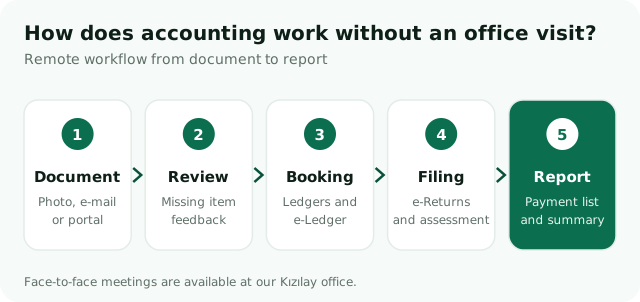
1. Sending documents
If purchase and sales invoices are issued as e-invoices or e-archive invoices, you often need not send them; the advisor accesses them through the system. Paper receipts are photographed by phone and sent by email, message or a shared folder. Bank transactions are obtained as statements or with read-only access.
2. Review and feedback
Incoming documents are reviewed. If a receipt is not in your name, an invoice is missing or a bank transaction is unexplained, you are asked in writing. This is the digital equivalent of the "this document is missing" conversation in face-to-face work.
3. Recording
Documents are entered into the accounting software; if you are in the e-ledger scope, the electronic ledger is created and its certificates uploaded.
4. Filing
VAT, withholding and social security, provisional tax and annual returns are filed electronically, and assessment slips are generated.
5. Report and payment notice
Copies of returns, assessment slips and payment amounts are sent to you with due dates. You can pay in minutes via online banking or the Revenue Administration's payment screens. Reports such as periodic profit and loss summaries are shared the same way.
Which authorisations are needed?
For online accounting to run smoothly, some authorisations should be set up at the start. Wherever possible, official authorisation methods should be preferred over sharing passwords.
| Authorisation | Purpose | How it is given |
|---|---|---|
| e-Return intermediary | Returns filed by the financial advisor | Agreement notified to the tax office |
| Digital Tax Office | Tracking debts, assessments and e-Notifications | Authorisation or shared tracking |
| Social security e-Declaration | Payroll, hiring, leaving and premium filings | User defined in the employer system |
| e-Invoice / e-Archive | Access to and review of invoices | User definition or integrator access |
| Bank read access | Obtaining account transactions | Statements or read-only access |
The first month of online accounting
The first month is spent setting things up. A short introductory meeting covers your activity, document volume and invoicing system. Authorisations are then completed, a shared document folder is opened and a communication channel is agreed. For a new business these steps run alongside formation; for an existing business, past returns and ledger records are taken over. From the second month the process becomes routine, and your part is simply sending documents regularly.
Communication
Success in online work depends on clear communication. You should have an assigned contact, a set response time and a phone line for urgent matters. Routine questions are handled by message or email, complex topics by a short video call. Reminders before filing periods and payment lists after filing make tracking easy. Written communication also keeps every decision and piece of information on record.
Digital document storage
Sending photos of documents does not mean you can discard the originals. Under tax law, books and documents must be kept for five years from the calendar year following the year they relate to; the commercial code's retention period is longer. e-Invoice and e-archive documents are stored electronically. Keeping paper receipts in monthly envelopes or folders makes any audit easier.
How is security ensured?
Financial data is sensitive; a few rules keep online work secure:
- Passwords should never be shared in plain text by email or message.
- Personal users and authorisations should be used wherever possible.
- Documents should be stored in access-restricted folders.
- Personal data should be processed in line with data protection law (KVKK).
- Authorisations should be removed when the working relationship ends.
When is a face-to-face meeting needed?
Online work covers most tasks, but some situations are better handled in person:
- Major decisions such as company formation, partnership structure or changing company type.
- Documents requiring wet signatures, signature declarations and notary procedures.
- Preparing for tax audits or settlement meetings.
- Year-end closing and budget planning.
People looking for an accountant in Kızılay often ask, "Can I visit the office when I need to?" Our office is in Kızılay, in Kültür neighbourhood, easily reached by metro, bus and minibus from across the city. Daily work runs digitally, and when needed an hour-long visit to the office is enough.
Who is online accounting suitable for?
The online model particularly suits freelancers, e-commerce sellers, software and consulting companies, couriers and businesses with branches in other cities. For businesses with heavy paper documents or frequent on-site meetings, a hybrid model combining digital communication with regular meetings can be more efficient. For example, we run most of our e-commerce accounting and motorcycle courier accounting services entirely online.
Online payroll for businesses with employees
Businesses with employees can also use the online model. Hiring details, timesheets, leave and overtime records are sent digitally; payroll is prepared and social security declarations and withholding returns are filed electronically. Payslips can be emailed to employees. A new hire must be notified before starting work, so sending details on time is critical. Our first employee checklist and payroll and social security page provide guidance.
Online vs office model
| Topic | Online model | Office model |
|---|---|---|
| Document delivery | Photo, email, folder | Hand delivery |
| Time | No travel or waiting | Office visit required |
| Risk of lost documents | Low, digital copy remains | Paper documents can be lost |
| Personal contact | Via video call | Face to face |
| Wet-signature matters | At the office by appointment | Directly |
Frequently Asked Questions
Is online financial advisory secure?
It is secure when working with a licensed financial advisor, using official authorisation methods and access-restricted document sharing. Passwords should not be shared in plain text and authorisations should be removed when work ends.
Can I form a company without visiting any office?
Most of the process is digital, but depending on company type you may need to visit the trade registry or a notary once for signatures. Details are in company formation in Ankara.
How do I send paper receipts?
Take a clear photo with your phone when you receive them and upload to the shared folder or send by message. Keep the originals for the legal retention period.
Can I work with your Kızılay office if I am outside Ankara?
Yes. Location does not matter in the online model; returns and filings are made electronically for all of Turkey. When you are in Ankara, we can also meet at our office.
Is the fee for online accounting different from office service?
The fee depends on company type, document volume, number of employees and scope of service. Providing it online does not change the scope. Ask for the included services in writing when getting a quote.
Who tracks my e-Notifications?
With authorisation, your financial advisor checks your e-Notification box regularly and informs you of incoming letters. Keeping your own e-Government notifications on is still a good safeguard against missing important letters.
How often should I send documents?
Ideally weekly, or at the latest within the first ten days of the following month. The full monthly calendar is in what monthly accounting includes.
In Short
Online financial advisory does not change the content of accounting services; it only removes travel, waiting and paperwork. With the right authorisations and a regular document flow, the whole process runs digitally.
We provide accounting services in Ankara both online and at our Kızılay office. See our bookkeeping and accounting page, or contact us for an initial meeting.